
I wanted a home router that could handle many devices without making my setup hard. The TP-Link AX1800 WiFi 6 Router (Archer AX21 V5) caught my eye for that reason. I like its mix of WiFi 6, four LAN ports, and simple setup. After looking at its key features and how it fits a real home setup, I found it is best for people who want solid WiFi without paying for a high-end router. In short, my TP-Link AX1800 WiFi 6 Router reviews take is simple: it is a good home router for normal streaming, work, gaming, and many connected devices.
Product Review
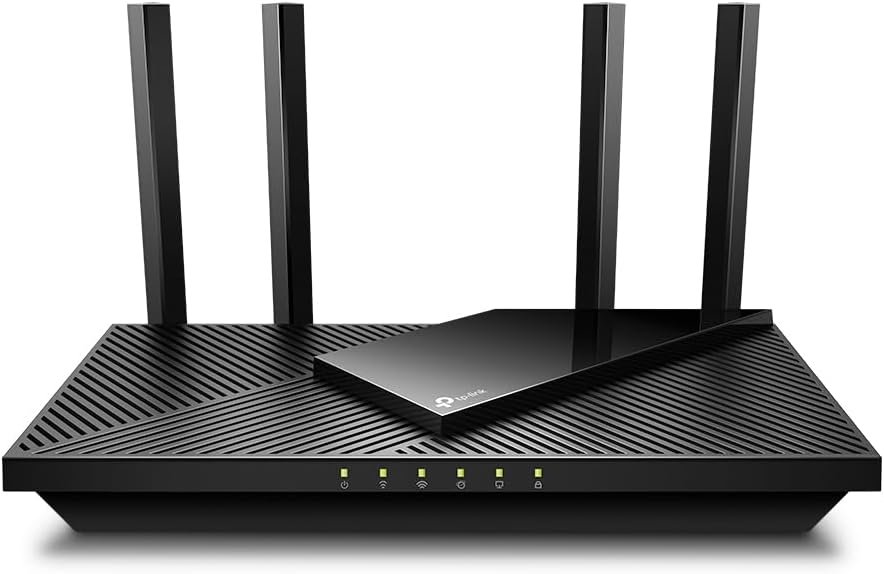
The TP-Link Archer AX21 V5 is a dual-band WiFi 6 router. It uses both 2.4 GHz and 5 GHz bands. The 5 GHz band can reach up to 1,201 Mbps. The 2.4 GHz band can reach up to 574 Mbps. Together, TP-Link calls this an AX1800 router.
What I like most is the simple setup. The TP-Link Tether app lets me set up and manage the router from my phone. I do not need to spend a long time digging through settings.
The router has four fixed antennas. It also uses beamforming to help send the WiFi signal toward connected devices. This can help when devices are farther from the router.
The Archer AX21 V5 also uses OFDMA. In simple terms, this helps the router deal with many devices at the same time. This is useful in a busy home where phones, TVs, laptops, tablets, and smart devices all use WiFi.
For wired devices, I get one Gigabit WAN port and four Gigabit LAN ports. I like having four LAN ports because I can plug in a PC, game console, TV, or other device without adding a switch right away.
The router also supports WPA3 security. It has guest WiFi, parental controls, and device-based QoS. These tools give me more control over how my home network works.
The Archer AX21 V5 supports EasyMesh. This gives me a way to build a wider WiFi setup later with compatible devices. That can be useful if one router does not cover the whole home.
The size is also fair for a home router. It is about 10.3 inches wide, 5.3 inches deep, and 1.6 inches tall. It is not tiny, but I can still place it on a desk or shelf without taking up too much room.
One thing I would keep in mind is that WiFi speed numbers are not the same as real internet speed. The 1.8 Gbps figure is the total wireless link rate. My real speed can change based on my internet plan, device, walls, distance, and network traffic.
What I Like
- I like the WiFi 6 support because it suits homes with many newer devices.
- The four Gigabit LAN ports give me useful wired options.
- The Tether app makes setup and basic control feel simple.
- The four antennas and beamforming are helpful for home coverage.
- I like having WPA3, guest WiFi, and parental controls in one router.
What Could Be Better
- The AX1800 class is good for many homes, but it is not made for people who want top-end WiFi speeds.
- The antennas are fixed, so I cannot remove or replace them.
- Large homes with thick walls may still need a mesh setup or another compatible unit.
My Personal Experience with TP-Link Archer AX21 V5
I see the Archer AX21 V5 as a router for normal daily life. It does not try to be a huge gaming box. It keeps the main job simple: give my home a stable WiFi link.
For work from home, I like the mix of wireless and wired ports. I can keep my main computer on Ethernet while other devices use WiFi.
For video calls, a busy network can matter more than raw speed. The WiFi 6 features are made to help the router handle several devices at once.
Streaming is another area where this router makes sense. A TV can use the 5 GHz band while phones and smart home gear share the network.
I also like the idea of using 2.4 GHz for devices that are farther away. That band often reaches farther than 5 GHz, though it is usually slower.
For online gaming, I would use Ethernet when I can. The four Gigabit LAN ports make that easy. For wireless play, the router’s WiFi 6 support can help reduce delay when the network is busy.
In a family home, the number of devices can grow fast. A few phones can turn into phones, tablets, TVs, laptops, cameras, and smart home gear. This router is built with that type of home in mind.
The Tether app is useful when I do not want to open a computer just to change a network setting. I can handle many basic tasks from my phone.
I also like having a guest network. It lets visitors use WiFi without giving them access to my main network.
The parental control tools can help families set time rules and block some sites. I would still see these as basic tools rather than a full family safety system.
The EasyMesh support gives me an upgrade path. If one router is not enough later, I can look at compatible gear instead of starting from zero.
One thing I would not do is buy this router only because I see the words “1.8 Gbps.” I would first check my internet plan and home size. A faster router cannot make a slow internet plan faster.
Comparing With Other Brands
I have also looked at routers from brands such as ASUS, NETGEAR, and Linksys. The TP-Link Archer AX21 sits in a useful middle spot. It has more features than a very basic router, but it does not aim at the high-end market.
TP-Link Archer AX21 vs Other Brands: Quick Comparison
For WiFi performance, the AX21 offers WiFi 6 with up to 1,201 Mbps on 5 GHz and 574 Mbps on 2.4 GHz. That is enough for many homes, but some newer routers offer higher class speeds.
For wired use, I like the four Gigabit LAN ports. This gives the TP-Link a practical edge for homes with several wired devices.
For network control, TP-Link gives me tools such as QoS, guest networks, parental controls, and WPA3. More costly models may offer deeper settings, but most home users may not need them.
For coverage, the four antennas and beamforming are helpful. Still, I would not expect one router to solve every dead zone in a large house.
For value, the AX21 makes the most sense when I want WiFi 6 features without moving into a costly premium router. That is where I think this model has its strongest appeal.
Recommendation
I would recommend the TP-Link Archer AX21 V5 to people who want a simple WiFi 6 router for an average home.
It makes sense for remote workers, families, streamers, casual gamers, and homes with many phones and smart devices.
I would also consider it for someone moving from an old WiFi 4 or WiFi 5 router. The jump to WiFi 6 can make more sense when many newer devices are connected.
I would do more research if I lived in a very large home. I would also look at a mesh system if I had several weak WiFi areas.
For a USA home, I like that the router has four Gigabit LAN ports. That is useful for common devices such as a desktop PC, smart TV, game console, or streaming box.
I would also check my internet plan before buying. If my plan is very fast, I may want a newer router with a higher WiFi class.
For most normal home use, though, I think the Archer AX21 V5 offers a nice mix of speed, control, and ease of use.
FAQs for TP-Link AX1800 WiFi 6 Router Reviews
Is the TP-Link Archer AX21 a good WiFi 6 router?
Yes. I think it is a good fit for normal home use. It offers dual-band WiFi 6, four antennas, Gigabit ports, and useful network controls.
How fast is the TP-Link Archer AX21?
The router has an AX1800 rating. Its listed wireless rates are up to 1,201 Mbps on 5 GHz and 574 Mbps on 2.4 GHz. Real speeds will vary based on the device, distance, walls, and internet plan.
Is the Archer AX21 good for gaming?
Yes, it can work well for gaming. I would use a wired Gigabit connection when possible for the most stable link. WiFi 6 can also help when several devices are using the network.
Is TP-Link Archer AX21 good for a home office?
Yes. I think it is a good home office choice for many users. The router supports WiFi 6 and has four Gigabit LAN ports for wired work devices.
How many devices can the Archer AX21 handle?
The router is designed to handle many connected devices with WiFi 6 and OFDMA. The real limit will depend on what each device is doing and how much traffic the network has.
Does the TP-Link Archer AX21 support WPA3?
Yes. The Archer AX21 supports WPA3 WiFi security. It also supports WPA and WPA2 modes.
Does the Archer AX21 support mesh WiFi?
Yes. The Archer AX21 supports EasyMesh. This can help you build a wider WiFi network with compatible devices.
Conclusion
After reviewing the TP-Link AX1800 WiFi 6 Router, I think the Archer AX21 V5 is a strong fit for everyday home use. I like its WiFi 6 support, four Gigabit LAN ports, easy app setup, and useful network controls. It may not be the right pick for someone who wants the fastest new WiFi class or needs to cover a very large home with one router. For a typical USA home, though, I think the TP-Link AX1800 WiFi 6 Router (Archer AX21 V5) offers a good balance of speed, features, and ease of use.