
The Anker USB C Hub is a small way to add more ports to a laptop. I like its mix of HDMI, USB-C, and USB-A ports.
It can send video to a 4K screen and charge a laptop at the same time.
I checked the key specs, use cases, and buyer feedback to see where it fits best.
In short, these Anker USB C Hub, 5-in-1 USBC to HDMI Splitter with 4K Display reviews point to a handy hub for work, home, and travel.
Product Review
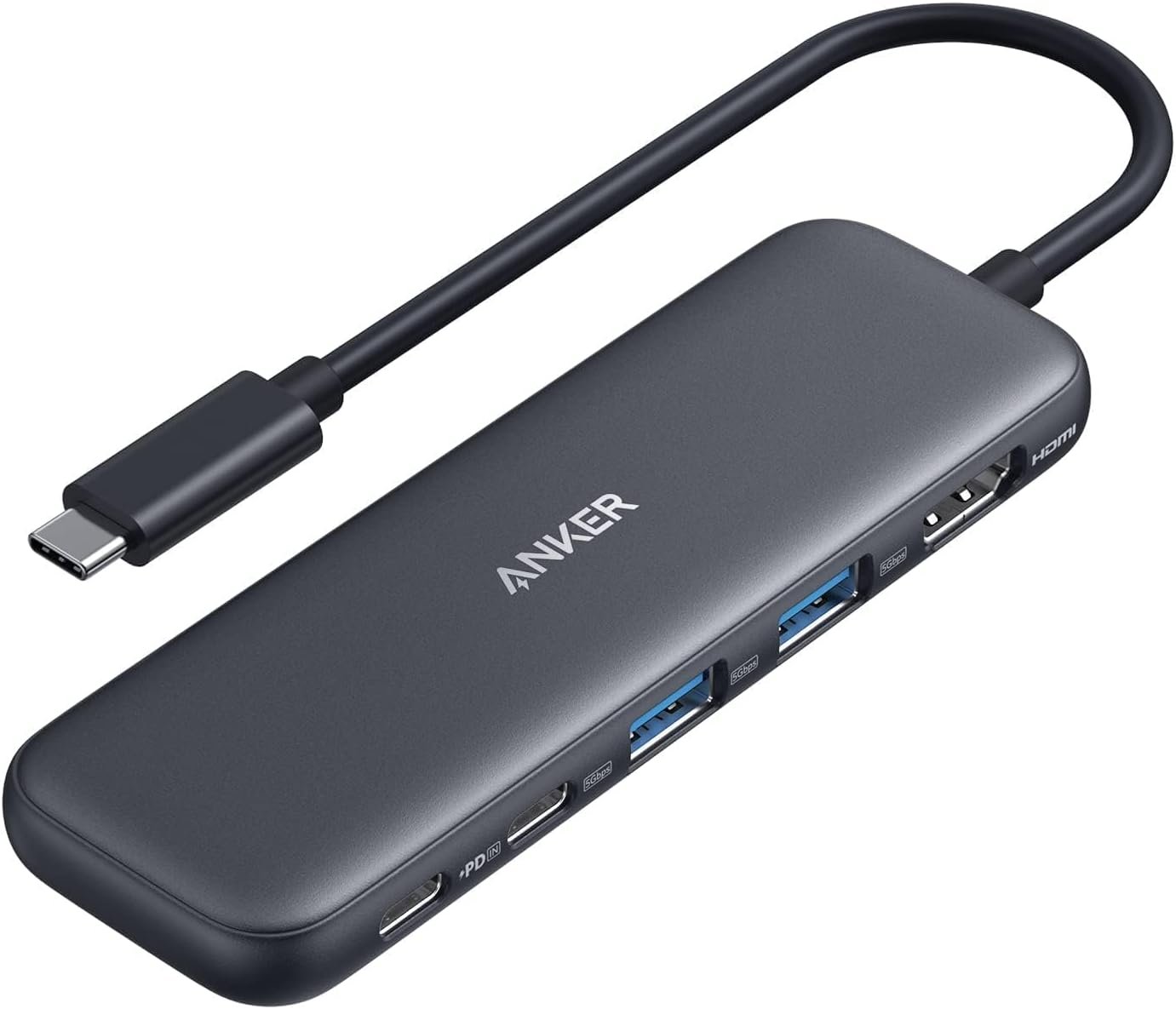
The Anker 5-in-1 USB-C Hub is made for laptops with a USB-C port. It turns one port into five useful connections.
The hub has one HDMI port, one USB-C data port, two USB-A data ports, and one USB-C power input. The data ports can reach speeds of up to 5Gbps.
The HDMI port is the main draw for me. It can send a picture to an outside screen at up to 4K at 30Hz. I can use it to mirror my laptop or extend the screen. (Anker)
The power input can take up to 100W. The hub uses some of that power, so the laptop can get up to 85W. The wall charger is not part of the hub.
The USB ports are also useful for daily work. I can connect a mouse, keyboard, flash drive, or other USB gear without using a stack of small adapters.
I like the 5Gbps speed on the USB-C and USB-A data ports. It gives me a much faster path for moving files than older USB 2.0 ports. (Anker)
The hub is also plug and play. Anker says no extra driver is needed for normal use. That makes setup simple for most users.
One thing I would watch is heat. Anker notes that the hub can get warm during charging or fast data work. That is normal, but I would still keep it clear and open.
The USB-C power port has a clear limit. It is for laptop power only. It does not work as a USB data port.
The hub also does not turn one HDMI port into two screen outputs. The 4K video comes from the HDMI port. The USB-C data port does not support video output. (Walmart.com)
For a simple desk setup, I think the layout makes sense. It gives me the main ports I would need without the size of a full dock.
Pros
- I get HDMI output for a 4K screen.
- The USB ports can move data at up to 5Gbps.
- It can pass up to 85W to a laptop.
- The plug-and-play setup is easy.
- The small size works well for travel.
Cons
- The HDMI output is limited to 4K at 30Hz.
- A wall charger is not included.
- The power-only USB-C port cannot handle data devices.
- The hub may feel warm during heavy use.
My Personal Experience with Anker USB C Hub
What I like most about this hub is how it can clean up a laptop desk. I do not need several small adapters hanging from one USB-C port.
For work, the HDMI port is the part I would use most. I can connect a larger screen and keep my laptop screen free for another task.
I also like having USB-A ports. Many older mice, keyboards, drives, and other items still use USB-A. This saves me from replacing gear just because my laptop has fewer old-style ports.
The 5Gbps data speed is a good fit for normal file work. I can use the hub for photos, files, and other data without relying on a slow USB 2.0 connection. (Anker)
The charging feature adds another useful touch. With a suitable 100W charger, the hub can pass up to 85W to the laptop while the other ports are in use. (Best Buy)
I would not buy it just for charging, though. The real value comes from having video, data, and power in one small unit.
For a home office, this can make a laptop feel more like a desktop. I can plug in my screen and desk gear through one hub instead of reaching behind the laptop each time.
It also makes sense for travel. A small hub can stay in my laptop bag and give me extra ports when I work from a hotel, office, or shared desk.
The 4K output has one catch. It runs at 30Hz, not 60Hz. That is fine for work, web use, and video, but I would look for another hub if high frame rates are a key need. (Anker)
I also would not expect the power input to charge every device. Its job is to send power to the laptop. It is not a normal USB-C data port.
Another small point is heat. The hub can warm up during heavy use. I would leave some air around it instead of putting it under papers or other items.
Overall, I see this as a simple laptop add-on rather than a full desktop dock. That makes it a better fit for people who need a few key ports and do not need a large list of extras.
Comparing With Other Brands
I would compare this Anker hub with other small USB-C hubs before buying. Some rival models offer more ports, while others focus on higher video rates or extra card slots.
Anker USB C Hub vs Other USB-C Hubs
For display use, this Anker model gives one HDMI connection with up to 4K at 30Hz. That is enough for many work setups, but users who want 4K at 60Hz should check other models. (Anker)
For data work, the 5Gbps USB ports are a strong fit for common drives and desk tools. The mix of USB-C and USB-A also gives me more choice when I connect older and newer gear.
For charging, the 100W input sounds high, but the laptop gets up to 85W after the hub uses its share. A charger is also needed, and it does not come in the box.
For port count, five connections are enough for a basic desk. I would look at a larger dock if I needed Ethernet, SD cards, several screens, or many more USB ports.
For ease of use, I like the simple setup. There is no need to install a special app or driver for normal use.
Recommendation
I would recommend the Anker USB C Hub to people who want a small hub for a laptop and need HDMI, USB ports, and laptop charging in one place.
It makes the most sense for office work, school, home use, and travel. It can also help turn a laptop into a cleaner desk setup with an outside monitor and basic USB gear.
I would research other hubs if I needed 4K at 60Hz. I would also look elsewhere if I needed Ethernet, SD card slots, or more than one display.
For USA buyers, I would check the current Amazon price before ordering. Prices can change. I would also make sure my laptop supports video through USB-C before expecting the HDMI port to work.
I would keep in mind that the charger is not included. If I need the full charging benefit, I would need a suitable USB-C wall charger as well.
FAQs for Anker USB C Hub
What is the Anker USB C Hub used for?
It adds more ports to a laptop with USB-C. This model gives you HDMI, USB-C data, two USB-A data ports, and USB-C power input.
Can the Anker USB C Hub support 4K?
Yes. The HDMI port can support up to 4K resolution at 30Hz. The laptop must also support video output through its USB-C port. (Anker)
Can this Anker hub charge a laptop?
Yes. With a compatible USB-C charger, it can pass up to 85W to a laptop. The hub can take up to 100W input and uses part of that power itself.
Does the Anker USB C Hub need a driver?
No. Anker lists the hub as plug and play, so normal use does not need extra software or drivers.
Does the USB-C port support video?
No. The USB-C data port is for data only. The HDMI port handles the video output. (Walmart.com)
Does the Anker hub get hot?
It can feel warm when it is charging a laptop or moving data at high speed. Anker says this can be normal during use.
Is the Anker USB C Hub good for a home office?
Yes, if you need a basic setup. I think it works well for one outside screen, USB devices, and laptop charging without taking up much desk space.
Conclusion
The Anker USB C Hub is a simple choice for adding key ports to a USB-C laptop. I like its 4K HDMI output, 5Gbps data ports, and up to 85W laptop charging. The 4K 30Hz limit and lack of an included charger are the main things I would keep in mind. For a clean home office or travel setup, I think this hub is worth a closer look if its five ports match your needs.