
I tested the Anker Laptop Docking Station Dual Monitor, 8-in-1 USB C Hub with 4K HDMI to see if it can make a laptop desk feel more like a full work setup.
I like how one small hub can handle two screens, wired internet, USB gear, and memory cards.
It feels most useful for home work and busy desk setups where one laptop port is not enough.
My short take: this Anker dock is a good fit for many Windows users, but Mac users should know its screen limits first.
Product Review
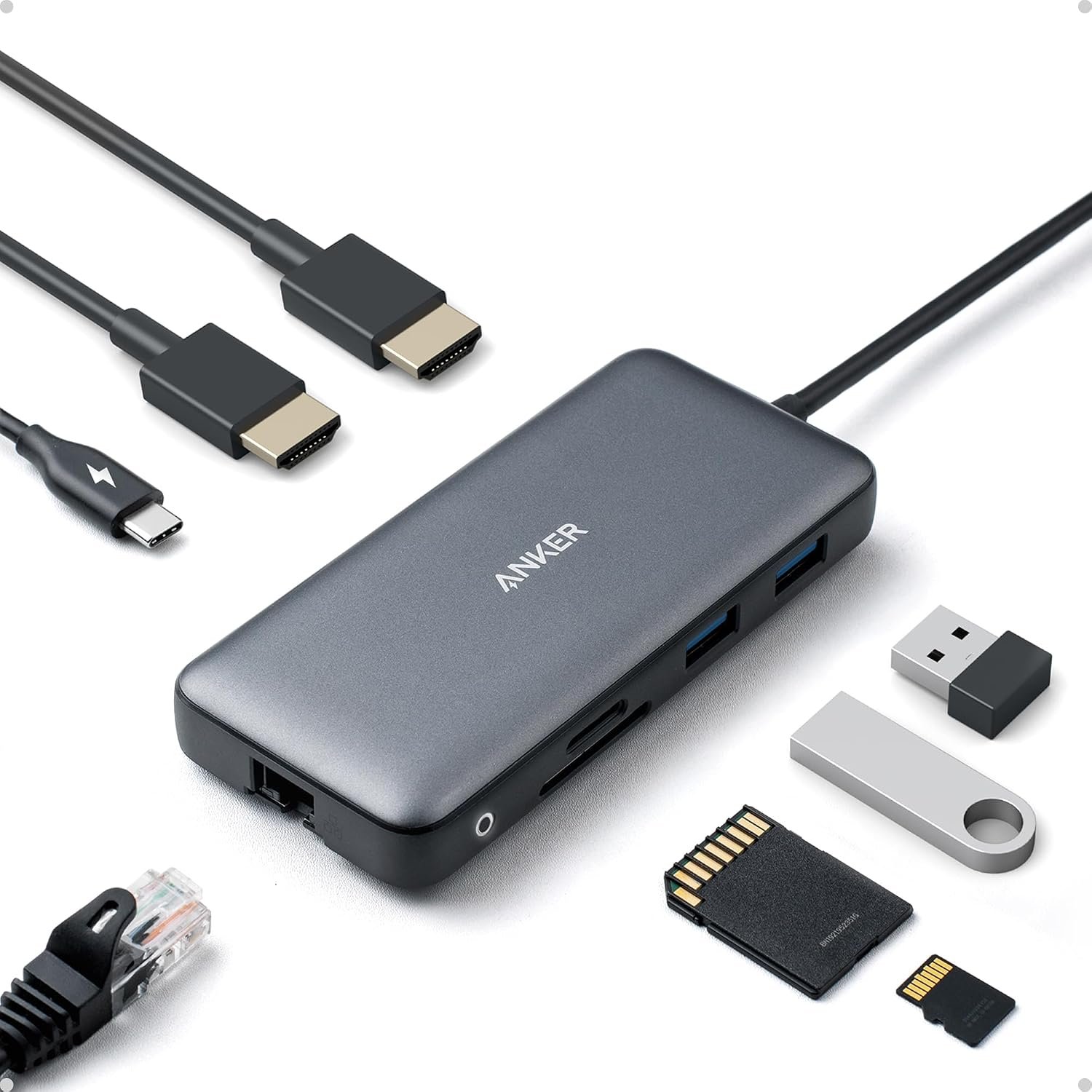
The Anker 8-in-1 USB C Hub is made to add more ports to a laptop. It has two HDMI ports, two USB-A ports, a USB-C power port, Ethernet, SD, and microSD slots.
I like this setup because I do not need to keep swapping cables. I can leave my mouse, keyboard, network cable, and screens plugged into the hub.
The two HDMI ports are the main draw here. With one screen, the hub can reach 4K at 60Hz. With two screens, it supports up to 4K at 30Hz on each screen.
That difference is worth noting. If I want two 4K screens for work, 30Hz is fine for many office tasks. It is not the same as having two 4K screens at 60Hz.
The hub can also pass power to a laptop. It supports up to 85W through USB-C Power Delivery when used with the right charger. The wall charger is not included.
I like the 1Gbps Ethernet port for a desk setup. A wired link can be handy when Wi-Fi is weak or when I want a more steady network link.
The SD and microSD slots are also useful. I can use them for photos, video files, or other data without adding another card reader.
The two USB-A ports help with older gear. That matters to me because many keyboards, mice, drives, and other desk tools still use USB-A.
The hub is small enough to keep near a laptop without taking much desk space. It also gives me a cleaner way to connect many devices through one USB-C link.
One key point is laptop support. The USB-C port on the laptop needs to support video output for the HDMI ports to work as expected.
Mac users also need to check the display setup. On macOS, the two outside screens show the same content rather than two separate extended views.
Pros
- Two HDMI ports make a dual-screen desk possible.
- Up to 85W power pass-through can keep a laptop charged.
- The Ethernet port gives me a wired network option.
- SD and microSD slots are handy for photo and file work.
- The small body keeps my desk setup neat.
Cons
- A wall charger is not included.
- Two 4K screens are limited to 30Hz.
- Mac users may not get two separate extended screens.
- The laptop must support video through USB-C.
- Some users report screen or port issues after long use.
My Personal Experience with Anker Laptop Docking Station Dual Monitor
I find this kind of hub most useful when I work from one fixed desk. I can connect the hub once and leave my main gear attached.
For a home office, the two HDMI ports can save a lot of time. I can keep email or notes on one screen and my main work on the other.
I also like the idea of using Ethernet at a desk. It lets me avoid relying on Wi-Fi for every task.
When I use a mouse and keyboard, the USB-A ports give me a simple way to keep both connected. I do not need extra small adapters for basic USB gear.
The card slots add more value if I work with photos. I can place an SD card in the hub and move files without using another reader.
For long work days, the power pass-through is useful. I can keep the laptop connected to power while the same USB-C link handles the hub.
I would not pick this hub just for gaming. The dual 4K setup runs at 30Hz, so it is more suited to work than fast games.
For video work, the choice depends on what I need. The card slots are handy, but people who move very large files all day may want a faster dock.
The size also works well for a small desk. I do not need a large box beside my laptop just to add a few ports.
I like the simple cable setup. One cable goes to the laptop, while the rest can stay attached to the hub.
Still, I would check my laptop before buying. A USB-C port does not always mean that it can send video to an external screen.
I would also check my Mac setup first. If I need two different outside screens on macOS, this is not the type of dock I would choose.
For normal office work, the limits are easier to accept. The hub gives me a lot of useful ports without taking up much room.
Comparing With Other Brands
I have also looked at docks from brands such as Dell, UGREEN, Plugable, and Satechi. Each one can make sense for a different type of desk.
Anker vs Other USB-C Dock Brands
For port choice, Anker gives me a good mix in a small body. The two HDMI ports, Ethernet, card slots, and USB ports cover many daily needs.
For screen use, I would pay close attention to the exact model. Some newer docks can handle two 4K screens at 60Hz, while this model is limited to 30Hz when both HDMI ports are in use.
For charging, the 85W pass-through is useful for many laptops. I still need a suitable USB-C charger because the dock does not include one.
For desk space, I like the compact shape. It feels more like a small hub than a large office dock.
For Mac use, I would research more before buying. The display limits can matter a lot if I want two separate external screens.
Recommendation
I think this Anker dock is a good choice for a Windows laptop user who wants more ports and a simple two-screen desk.
I would pick it for home office work, school work, photo use, and general desk tasks. The mix of HDMI, USB-A, Ethernet, SD, and microSD makes it quite useful.
I would do more research if I need two 4K screens at 60Hz. I would also look at other docks if I need separate extended screens on a Mac.
For buyers in the USA, I would check the current Amazon price before ordering. Prices can move up or down. I would also make sure I already have a USB-C charger that can provide enough power.
My biggest buying tip is simple: check the laptop port first. The dock can only do what the laptop’s USB-C port allows.
FAQs for Anker Laptop Docking Station Dual Monitor, 8-in-1 USB C Hub with 4K HDMI Reviews
Can this Anker dock connect two monitors?
Yes. It has two HDMI ports for two outside screens. With both HDMI ports in use, the max is up to 4K at 30Hz per screen.
Can this Anker hub charge my laptop?
Yes. It supports up to 85W power pass-through. You need a suitable USB-C PD charger, and the charger is sold separately.
Does this Anker dock work with MacBooks?
It can work with compatible MacBooks, but there is an important display limit. The two outside screens may show the same image instead of acting as two separate extended screens.
Does the Anker 8-in-1 hub support 4K?
Yes. With one display, it can support up to 4K at 60Hz. With two HDMI displays, the max is up to 4K at 30Hz.
Does it have an Ethernet port?
Yes. It has a 1Gbps Ethernet port. I like this for a home office where a wired network can be useful.
Does it have SD and microSD card slots?
Yes. It has both SD and microSD slots. This can be handy for photos, videos, and file transfers.
Do I need a special USB-C port on my laptop?
Yes. The laptop needs a USB-C port that supports the needed video and power features. A USB-C port alone does not always support external screens.
Conclusion
The Anker Laptop Docking Station Dual Monitor is a useful 8-in-1 hub for a busy laptop desk. I like its mix of two HDMI ports, Ethernet, USB ports, card slots, and 85W power pass-through. The main limits are the 30Hz cap when two 4K screens are used and the Mac display setup. For a Windows home office user who wants more ports from one USB-C connection, I think it is a solid option.